
iPhoneMap
Meet iPhoneMap
A simple Mac app that gives you a visual map of your iPhone Home Screens — making it easier to see, plan, and organize where your apps are located.
Get iPhoneMap Available for macOS • $2.99Over time, an iPhone can accumulate dozens — or even hundreds — of apps spread across multiple Home Screens. Finding an app or deciding how to reorganize those screens can quickly become frustrating.
That's why we created iPhoneMap. It provides a visual representation of your iPhone Home Screens on your Mac, giving you a much larger workspace for understanding how your apps are arranged.
What is iPhoneMap?
iPhoneMap is a macOS application designed to help you visualize and organize the layout of your iPhone's Home Screens.
Using the larger display and familiar mouse or trackpad interface of your Mac makes it much easier to examine your screen organization and plan where apps should go.
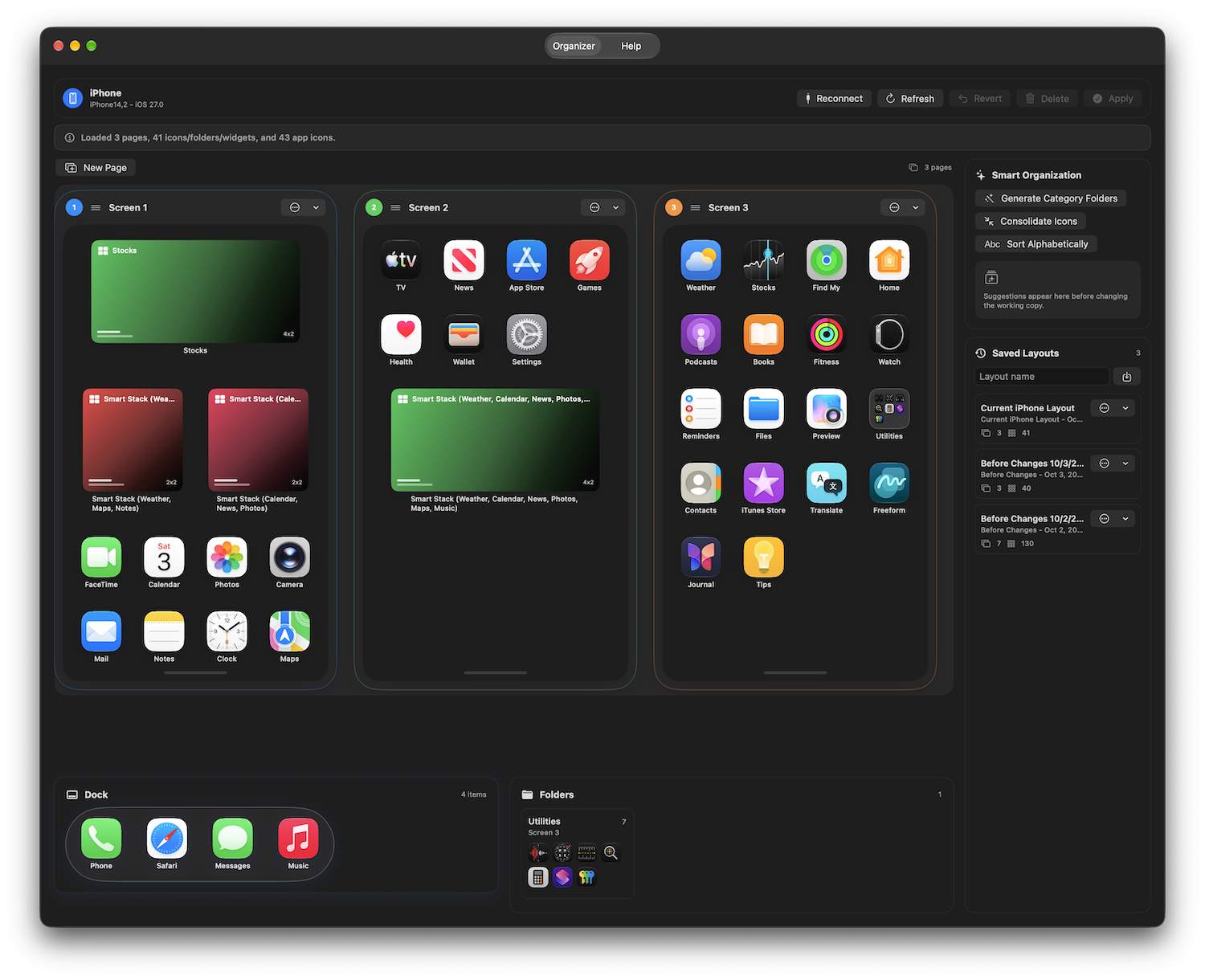
A Better View of Your iPhone
iPhoneMap is designed around a simple idea: organizing your iPhone is easier when you can see the bigger picture.
Visual Home Screen Map
View your iPhone Home Screens in a larger visual workspace instead of navigating one screen at a time.
Find Apps More Easily
Quickly determine where an app is located within your Home Screen organization.
Plan Your Layout
Experiment with different organizational ideas before making changes to your iPhone.
Designed for Mac
Take advantage of your Mac's larger screen, keyboard, mouse, and trackpad while planning your iPhone layout.
How It Works
iPhoneMap keeps the process simple.
Create Your iPhone Map
Set up a visual representation of your iPhone Home Screens inside iPhoneMap.
See the Bigger Picture
Review your screens from your Mac and see how your apps are distributed across your iPhone.
Plan Your Organization
Decide where apps should be placed and create a cleaner, more logical Home Screen arrangement.
Organize Your iPhone
Use your iPhoneMap layout as a visual guide while arranging your actual iPhone Home Screens.
Why We Created iPhoneMap
Apple once provided desktop tools that made managing the organization of an iPhone much easier. As iPhones have grown more capable and the number of apps we use has increased, managing multiple Home Screens directly on the phone can become cumbersome.
iPhoneMap brings the convenience of a larger desktop workspace back to the process.
Whether you have a carefully organized iPhone or years of apps spread across numerous screens, iPhoneMap gives you a clearer way to understand your layout and decide how you want it organized.
Who Is iPhoneMap For?
iPhoneMap is especially useful if you have several Home Screens, frequently have trouble remembering where apps are located, or simply want a more organized iPhone.
It's also helpful when setting up a new iPhone or redesigning an existing Home Screen layout.
Ready to Map Your iPhone?
See your iPhone Home Screens from a new perspective and make organizing your apps easier with iPhoneMap.
Get iPhoneMap iPhoneMap for macOS • $2.99